Release Guaranteed No-Show Reservations
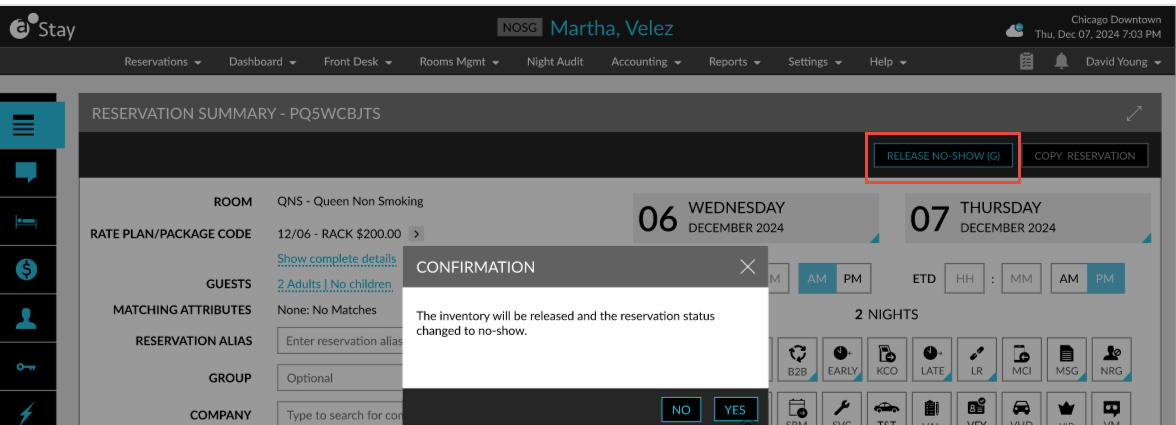
Users can release a reservation marked as No-Show (Guaranteed) using the Release No Show (G) option in the Reservation Summary section of the reservation. This button is displayed only for guaranteed no-show reservations. When this button is clicked, a Confirmation pop-up screen appears that displays the following message: The inventories associated with this reservation will be released, and the reservation status will be changed to No Show.
When users click Yes, the inventory is released, and the reservation status is updated from NOS (G) to NOS.
When users click No, the pop-up screen closes, and the following changes occur:
-
The status remains as NOS (G).
-
The status is updated as NOS after the room assigned is released.
-
The CXL status is sent to interfaces during date roll.
-
The Reinstate option is displayed for the reservation until the date roll once it is released.
-
The inventories are released after the NOS (G) status is released.
-
Users cannot close the reservation folios until the NOS (G) status is released. Folios can be closed manually after the release.